
Overview
Summary
Spreadsheet softwares like Microsoft Excel and Google Sheets are powerful tools for organizing, analyzing, and presenting data in a tabular format, widely used in engineering for efficiency. Engineers leverage these tools for data analysis, simulations, and statistical modeling, enabling accurate and fast calculations. They are also integral to design documentation, serving as repositories for tracking parameters. In project management, spreadsheets help create schedules, allocate resources, and manage budgets. Additionally, they integrate with engineering softwares such as CAD, streamlining workflows. Overall, spreadsheets are vital for engineering documentation, ensuring standardization, traceability, and clarity in complex projects.
Learning Outcomes
- Recognize the main capabilities of spreadsheet software for engineering applications
- Manipulate common formulas employed in engineering applications
- Produce graphical representations from data in spreadsheet software
Spreadsheet Software Comparison
Sheets vs Excel
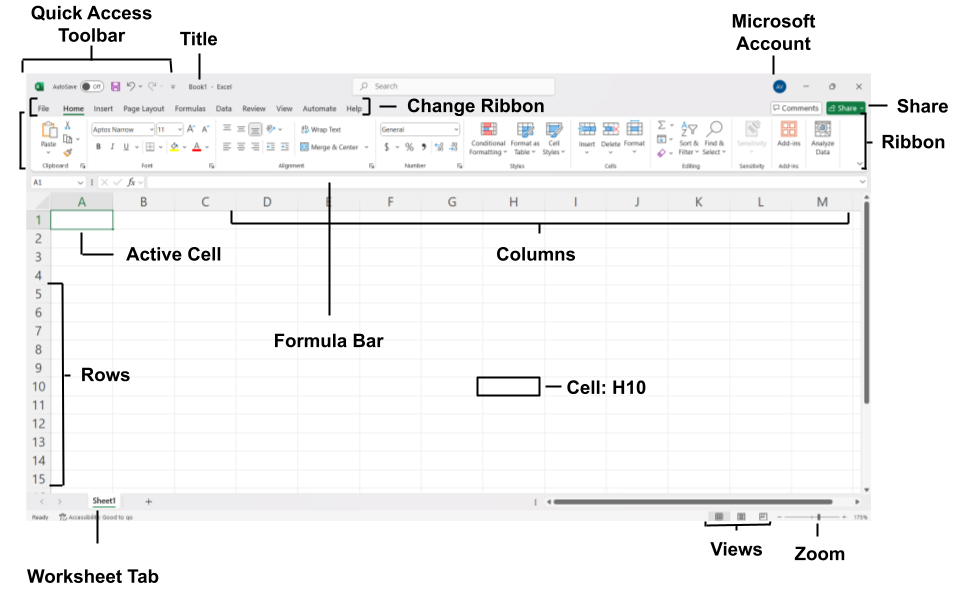
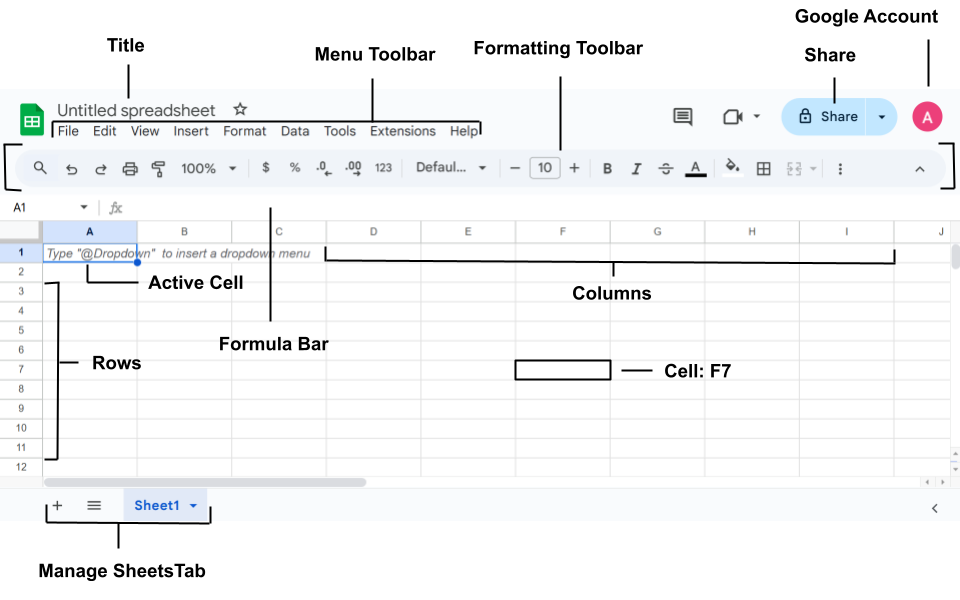
Both Excel and Google Sheets offer similar features, however there are a few differences to consider when choosing between the platforms. Excel is known for assisting in more complex data sets, offering a much wider range of functions and features. Consequently, Excel is much less intuitive and may require more proficiency to utilize its full capabilities. Google Sheets is designed with simplicity in mind, offering a much more user friendly interface. Additionally, Google Sheets provides users with more collaborative features, better suited for working with large teams. However, Google Sheets has a less extensive library of functions, leaving out statistical and other data analysis tools. Overall, both platforms can be utilized for different needs. Excel is considerably more powerful and extensive in analyzing data, while Google Sheets offers a more simplistic design and fosters collaboration.
Excel
Google Sheets
Spreadsheet Formulas
Summary
Formulas in spreadsheet software are expressions used to perform calculations and data manipulation. They typically begin with an equals sign (=) and can include arithmetic operators like +, -, *, and / for basic calculations, as well as built-in functions for more advanced operations, such as SUM for summing values. Formulas also utilize cell references to dynamically incorporate data from other cells, enabling updates when the source data changes.
| Function | Excel | Google Sheets |
| Average | =MEAN() | =average() |
| Maximum | =MAX() | =max() |
| Minimum | =MIN() | =min() |
| Count Cells | =COUNT() | =count() |
| Conditional | =IF() AND OR | =if() and or |
| Add Values | =SUM() | =sum() |
| Arithmetic | + – * / ^ | + – * / ^ |
| Remove Data | =DROP() | N/A |
| Look Up Data | =VLOOKUP() | =vlookup |
| Expand Array | =EXPAND() | N/A |
| Standard Deviation | =STDEV() | =stdev() |
For full list of functions in Excel visit Excel Function List
For full list of functions in Google Sheets visit Google Sheets Function List
Spreadsheet Software for Engineering: An Applied Guide
For further information on spreadsheet softwares in engineering, refer to this guide that introduces practical applications through real-world engineering problems. This resource is especially useful for students seeking hands-on exercises in applying spreadsheets to technical challenges.
The resource contains sections on formatting, charting, and exercises for students seeking additional information.