
You will need to go outside and collect your own data during this part of the Ecology Project (Benchmark #1). Each student should sample and collect data on their own 2 trees. Group members should not be sampling and collecting data on the same individual trees.
Use the Data Collection Handout for Fall/Summer to enter your Leaf Herbivory data and upload the completed handout to Moodle at the indicated date for your lab section.
Before going out in the field to collect data:
- Read the Background and Methods information before going in the field. This will provide a basic understanding of what you will do out in the field. NOTE: There is some additional information and resources listed below that will supplement what is in the Background and Methods.
- Review Images of types of leaf herbivory, fungal infection and other tree associations (needed to complete types of Herbivory in the Data Collection Handout above).
- Review the Field Work Safety Guidelines and plan accordingly.
- Make sure you have Excel or access to Google Sheets (students can download Microsoft Office 365 from NC State’s OIT(opens in new window) software site for free!) You will need it for Part II of the project.
Expanded Explanation of Sampling Methods:
Materials you will need in the field
- Directions for how to collect data. The most important steps are listed below for quick access, but also locate them in the Background and Methods information you accessed above. Be sure you can read the directions on your mobile device or print out directions to take with you when collecting your data.
- Use the following Data Collection Handout for Fall/Summer.
- Use the grid that you received from your lab instructor for measuring surface area (or download a surface area app on your phone such as LeafByte for iPhone or BioLeaf **not currently working F25 for Android** and review the tutorials before going outside).
- a magnifier app for your phone, for example, Magnifying Glass for iPhones or Android
- pen or pencil,
- a clipboard or other writing surface with white paper,
- phone camera/regular camera,
- list of random integers (see below, Methods, Step 3)
Safety Reminders: Please be mindful of traffic, wildlife, standing water, any sort of brush or vines that may be hazardous. Wear closed-toed shoes and socks to cover your ankles. You may want other protective items like a hat, sunscreen, long-sleeved shirt and long pants.
You will be conducting data collection in any area where you can find trees (around your home, neighborhood, a local park, greenway, NCSU campus etc.). NOTE: We are conducting non-destructive sampling, so do not remove leaves from the trees or harm surrounding areas as you complete data collection.
1 – Location – Select an area where you can locate at least two different trees. Ideally, they will be different species of trees so that you can compare them with respect to herbivory and fungal incidence, or you can pick different areas (for example, a completely natural area, a landscaped area, an urban area) and then select the same species of tree in each area. It is up to you how you want to design your study.
Walk around each tree to visually inspect it, noting any organisms, overall leaf damage, bark damage, lichens, mosses, etc. Take pictures of each of your trees and any associated organisms or interesting observations. Identify your trees down to genus and/or species. Use the ID resources listed below. Include the location of the tree and its surroundings (add GPS location/geotag, if possible).
Note all of your observations in the space provided in your Data Collection Handout (see above). Also, include a brief description of your sampling location(s).
2 – Leaf Surface Area – Choose one area on the tree that has evidence of herbivore damage and “select” a leaf to evaluate. Look for herbivory and fungal damage/presence using visual analysis (use magnifier app on your phone). Also, refer to images in the Herbivory Example webpage to determine the types of herbivory present. Without removing the leaf, you will place a 1 cm2 grid/graph paper transparency over the leaf to calculate approximate leaf surface area. You can also take a picture of the leaf under the clear grid against a white background/paper and calculate the leaf surface area later. Alternatively, you may use the surface area app on your phone (see type of approved apps in Materials – be sure to practice using it before taking your surface area measurements out in the field).
Calculations if using a grid: Watch the video for an explanation of the process, and a video with an actual leaf.
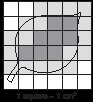
- Full square or squares more than half full = 1 cm2
- Half-filled square = 1/2 cm2
- Less than half filled square = 0 cm2
- Calculate and record the overall leaf surface area (all possible squares that the intact leaf would take up.
- Calculate the area damaged and/or missing due to herbivory.
- Calculate the area damaged by fungal infection.
3 – Random Sampling – Repeat the above surface area calculations using simple random sampling for a total of 10 different leaves for each of your sampled trees and record your data in Table 4.1-1 in the the Data Collection Handout. Use the random integer generator: **Instructions below:
**Random integer generator instructions – Input the following:
Part 1: The Integers
Generate random _10_ integers (maximum 10,000).
Each integer should have a value between _1_ and _10_ (both inclusive; limits ±1,000,000,000).
Format in _2_ column(s).
Part 2: Go! Click on get numbers. Take a picture or screenshot. You will need these in the field.
Using a piece of paper, cut it into four equal pieces and write, “Left,” “Right,” “Up,” or “Down.” You will randomly select which way you want to go by shaking up your paper pieces in a bag or other container and choosing one square each time. Return the used square to your bag/container. Repeat until done with all leaves.
Video showing random sampling technique using the randomly generated numbers and the “Left” “Right” “Up” “Down” squares.
NOTE: If you get “Up” and you cannot go that high or cannot sample that leaf for any reason, go to the next random number until you find a leaf you can sample.
- Take pictures of types of leaf herbivory you observe on your tree.* Insert them into the Data Collection Handout, and bring them to the In-Lab meeting.Take pictures of types of fungal infection you observe on your tree.* Insert them into the Data Collection Handout, and bring them to the In-Lab meeting.
*(Use the Herbivory Examples webpage and the Resources in the list below to identify the type of leaf herbivory and fungal infection.
4 – Be sure to record all of the data in the appropriate Data Collection Handout for Fall/Summer or Spring provided above.
Click for Unit 4.1 Benchmark #1 directions
What to turn on on Moodle for Benchmark #1 by Unit 3 Friday 11:59PM:
1. Completed Unit. 4.1 Leaf Herbivory Data Collection Handout Fall/Summer.
2. Completed Benchmark #1 Unit 4.1 Individual Data Representations template that includes the 2 graphs described in parts 1, 2, and your written comments explained in part 3 in the Benchmark #1 template.
Resources:
Tree Health and Urban Ecology:
13 Steps for evaluating tree health:
https://www.deeproot.com/blog/blog-entries/13-simple-steps-to-evaluate-trees
Damage to landscape trees from NC State’s Extension program:
https://gardening.ces.ncsu.edu/weather-2/storm-damaged-landscape-trees/
What Tree Should be Planted from NC State’s Extension program:
https://lenoir.ces.ncsu.edu/2019/02/what-tree-should-be-planted/
Arbor Day Foundation – https://shop.arborday.org/treeguide/
Tree and Organism Identification: Here are some resources in the form of links
and applications (some of these apps are not free, but you can search for your own online too):
NC Tree Identification from NC State’s Extension program:
https://gardening.ces.ncsu.edu/2015/08/nc-tree-identification/
NCSU Extension – Plant Guide – https://plants.ces.ncsu.edu/
Lady Bird Johnson Wildflower Center https://www.wildflower.org/plants (good for native plants)
Trees – NC State Resources Extension Program:
https://gardening.ces.ncsu.edu/gardening-plants/trees-3/
ChopDoc – list of apps for tree identification by leaves and bark:
https://chopdoc.com/how-to-identify-tree-by-leaves//
Seek by iNaturalist – app that helps you identify organisms: (plants, animals including insects, fungi)
https://www.inaturalist.org/pages/seek_app
MyNature Tree Guide:
Android: https://www.amazon.com/MyNature-Inc-Tree-Guide/dp/B00CJ1OYV4 find link
iPhone http://www.mynatureapps.com/mynature-tree-guide/
iBird: http://ibird.com/# under construction
Merlin Bird ID: https://merlin.allaboutbirds.org/
Audubon Bird Guide App: https://www.audubon.org/app