Discovery and the Scientific Method
Scroll below for In-Person Labs
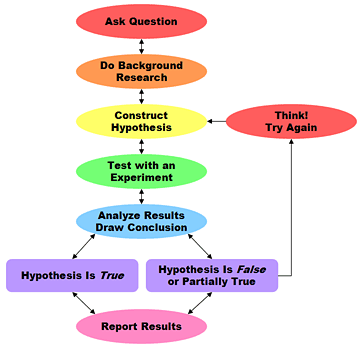
Review the following before you come to lab:
- Read the Lab Unit 3 Discovery & the Scientific Method, and Appendix E Understanding and Representing data which can also be found on the Resources webpage.
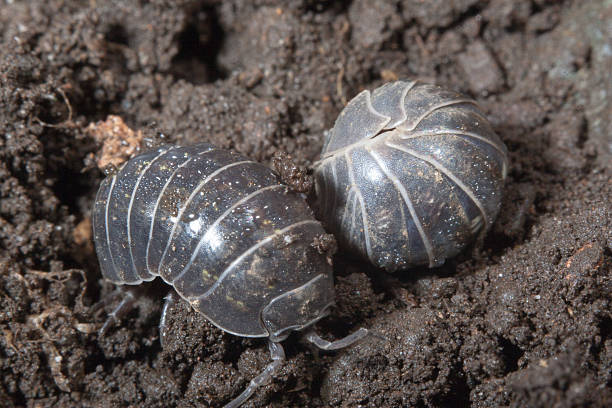

Pill bugs, left, and and Sow bug on the right, look quite similar, but careful examination will show their differences.
As you work through the activities in class, you should answer all questions/answer boxes within the Lab Handout. These will help you understand and answer the questions at the Post Lab Individual Work attached below in the yellow assignment box.
Activity One: Designing and Conducting an Experiment
As a table, each group of students should review the background information provided in the lab manual and make some of your own direct observations on these isopods. Then design and carry out their own experiments to learn more about Pill bugs and/or Sow bugs and practice designing experiments.
Groups should discuss their ideas and experimental design with their TA before setting up and running the experiment. Fill out the indicated questions/fields identifying all the indicated experimental components and variables under YOUR EXPERIMENT in the Lab Handout. Careful planning is key to designing a good experiment. Your TA will need to review and approve the Design before the group can carry out their experiment.
Working as a group, write up your Experimental Design in your Lab Unit Handout under YOUR EXPERIMENT. You will need to identify all indicated variables.
As a group, conduct the experiment and take a picture of your set up in action. Collect data and consider what type of graph will best represent/summarize your data. Is it important to Include all data points or data averages? You may find the Lab Manual Appendix E Understanding and Representing Data (covers types of data and graphs) and Appendix D Graphing Using Excel (p. 220 for key graphing components) helpful or LabWrite – Resources – Data Representations shows examples of Data Types, Tables and Various Types of Graphs. Graphs should be produced using a graphing program, such as Excel or Google Sheets. Hand drawn graphs will not be graded. NCSU Students can download Microsoft Office 365 from the NC State’s OIT software site for free.
Class discussion – After running the experiment, collecting data, and presenting to the class, what were the strengths of your design – what worked well? What problems did you face? How might you revise your experiment? Often preliminary data collection is necessary to revise and design better experiments!
Post Lab Individual Work
Complete this attached End of Unit Questions Handout found here. Upload your work into Moodle by the End of Lab or up to 24 hours after the end of your lab section this week.
Group Work Contract
Complete the attached template as a group. This contract will serve as guidelines for all your graded group work for the semester.
Leave a copy of this in your Google Group Work folder and turn it in on Moodle within 48 hours of this in Person Lab Week.
Only 1 person will need to submit this for the group.
Ecology Group Work Week 1
Click to access the Unit 4.1 Benchmark #2 webpage
Read the Benchmark #2 directions on what to do and submit concerning your COMBINED GROUP data.
Benchmark #2 is due by Friday 11:59PM of the Ecology Work Week 1.
WildCam Lab Report – Group Work
Use the LabWrite website to write a Full Lab Report using data from your Unit 2 completed lab group WildCam assignments. Groups should use and cite at least one primary and one secondary reference in their text and provide a properly formatted CSE Reference section (Refer to the links in “Writing Lab Reports” below). References are generally introduced in the Introduction & further used in the Discussion. Click this box for further details.
Please complete ALL written group work in your Lab Google drive folder to optimize access and contributions from everyone. Directions will be provided in your Lab Google folder.
1. This Group writing assignment is due by Friday 11:59PM of your Ecology Project Work Week 1. This provides your group ample time to write the First Draft Full Lab Report and submit it in Moodle. The group should also complete the provided Lab Report Rubric adding comments and grading each section of their own report.
2. Quick feedback will be provided by the TA to ensure proper formatting, depth and use of citations.
3. The Final WildCam Lab Report is due at the end of Unit 5 by the Friday 11:59PM Moodle.
4. There will also be an Individual Peer Group Work Evaluation due with the final Lab Report. See information below.
If AI is used to help write this report, be sure to follow and include all steps in the guidelines for “Using AI…” link below.
Lab Report Rubric – use for guidance in writing and grading the Lab Report. Groups should use this rubric to evaluate your Lab Report before turning it in on Moodle. Be sure to write comments and grade each section to support your paper. Turn in the completed rubric along with the First Draft of the Lab Report.
Individual Peer Group Work Evaluation form-
- Each student will use the provided form to rate themselves and their group members on their contributions to this group written Lab Report.
- Each student must also explain their own contributions on each part of the process in the Notes column. Adding notes about other group members can also be added.
- This form is only submitted on Moodle to share with the TA.
- It must be submitted by the due date (same as the final Lab Report) to be eligible for a possible 5 pts.

Introduction to Writing Lab Reports
- Inside-Out-Approach to writing lab reports
- LabWrite Home
- LabWrite – PostLab: Writing your Lab Report – follow the directions on this webpage. This approach will guide you through the whole process of writing a full lab report so that your work is fully synthesized. Visit all the internal prompts/links as needed.
- LabWrite – Resources – Data Representations – showings examples of Data Types, Tables and Various Types of Graphs
- Lab Report Rubric
- Guide to Analyzing Sections of a Lab Report — Pretend you are grading your report. How did you do
- PPT that shows common mistakes with plagiarism
- PowerPoint from a Workshop on Writing Lab Reports
- (PPT tells you the basics, but also addresses common mistakes and questions from past students.)
- Writing tips for Scientific Writing (Active/Passive Voice, Wordiness, References, Pronouns, Tense Issues, Syntax)
- Sample Lab Reports –Look at formatting AND how references are used and cited.
- View a Sample Scientific Journal Article – Honey Bee Article – – Lab Reports use the same format as primary literature and are great practice for reading, writing and understanding primary literature.
Using AI Generative Text to Write Lab Reports
Use this information if you decide to use an AI Generative Text source such as ChapGPT. Be sure to follow and include ALL of the steps along with the citation and reflection piece into your final Lab Report document.
Finding and Citing References in your Lab Report
- Check out the Resources page on the main Lab homepage to help with writing in-text citations and full references.
- 9th Edition CSE Scientific Style and Format Citation Quick Guide
Additional help outside of the Biology Department and your TA
The Scientific Process
Graphing Resources
- Appendix D – Graphing Using Excel
- Appendix E – Understanding and Representing Data
Sample Scientific Papers
Sample Scientific Papers – Primary vs. Secondary literature
- Is your paper Primary and Secondary literature? How can you tell?
- How well did the paper follow Lab Report/Scientific literature structure? Did anything seem odd or different for you? Does this change your idea of Primary or Secondary Literature? Why or why not?
Oral Scientific Communications: Presentations
This week Groups will compile an abbreviated presentation using a provided presentation template.

- Appendix C: Making Presentations(opens in new window) on Resources webpage.
- Organize information and PRACTICE before you present.
- Be professional in what you present (use visuals) AND in what you say.
- Your presentations should follow the same general format/sections of a scientific paper.
- Include primary literature references in your presentation.
- Be prepared to answer scientific questions related to your experimental design, results, etc.
How to record your Presentation in Zoom and save to the cloud. For screen sharing and recording, you may need to unlock/enable permissions from your computer preferences menu (not zoom preferences). ALSO REMEMBER TO PROVIDE THE ZOOM PASSWORD with your Zoom link on your title slide.